
THE 30-SECOND VERSION
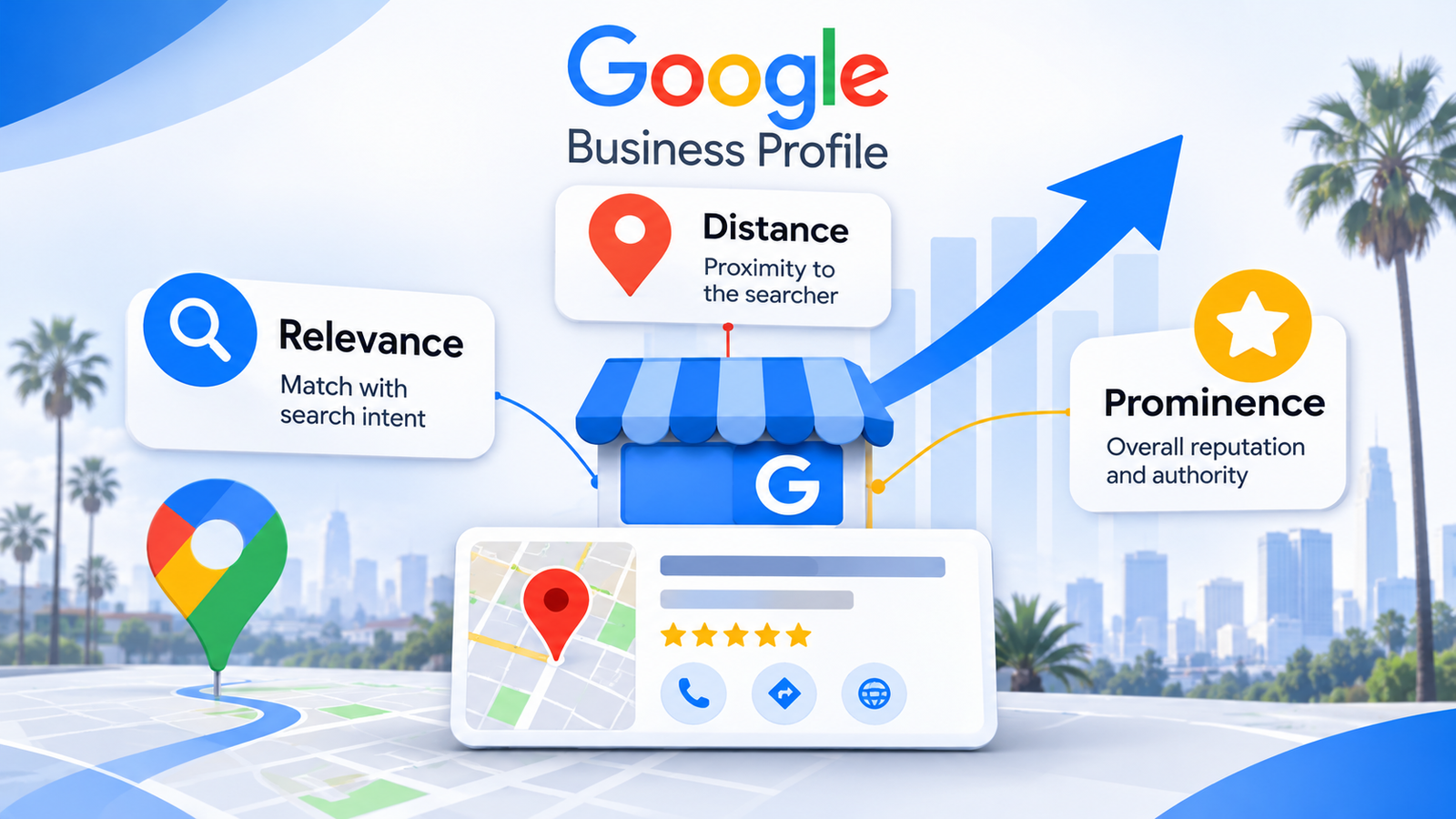
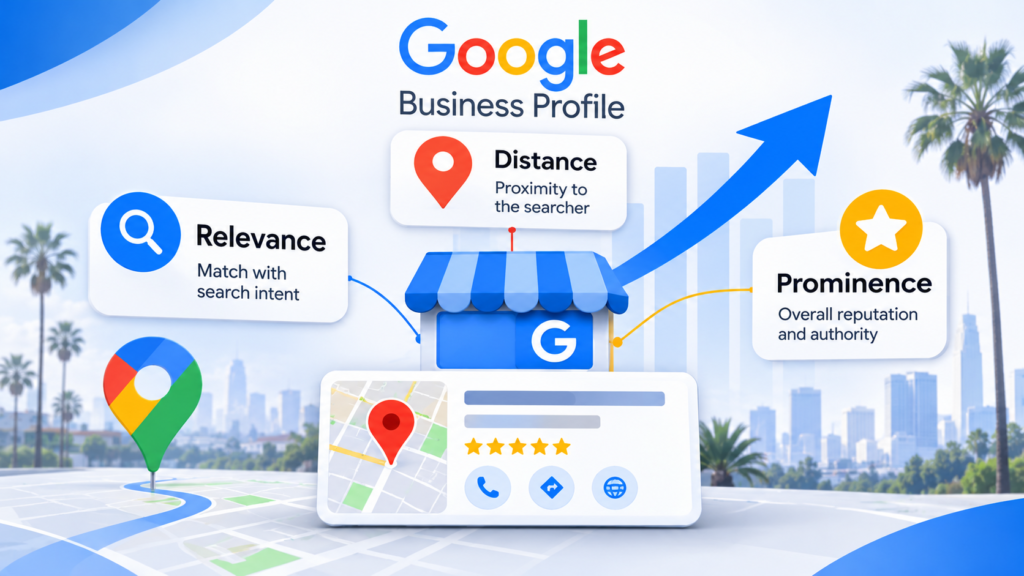
Google Business Profile optimization in California comes down to three things Google names openly: relevance, distance, and prominence. You control relevance and prominence. You do not control distance.
- Category is the single highest-impact field. Your primary category tells Google which searches you are eligible for at all.
- Reviews feed prominence. Google states plainly that more reviews and higher ratings can improve local ranking.
- Distance is fixed. You cannot rank in a city you have no real presence in, and faking one gets profiles suspended.
- Service area businesses play by different rules. No storefront means hiding your address and capping your service area.
- Track directions and calls, not views. Views are vanity. Directions requests are intent.
California adds one wrinkle: density. In Los Angeles or San Jose, a competitor two miles closer to the searcher can outrank you on distance alone. That leaves relevance and prominence as the only levers you have.
Why Does Google Business Profile Optimization Matter More in California Than Almost Anywhere Else?
California has 4.3 million small businesses, according to the 2026 California Small Business Profile published by the US Small Business Administration’s Office of Advocacy.
That is 99.8 percent of all businesses in the state, employing 7.6 million people.
Now picture what that density does to a map. A search for “dentist near me” in Westwood does not return the best dentist in Los Angeles. It returns three dentists who are close, relevant, and well known to Google, in that order of filtering.
That is the whole game. In a small market, a mediocre profile still ranks because there is nothing else nearby. In California, there is always something else nearby.
We will be straight with you. Most of the California-specific advice published on this topic is general local SEO with city names sprinkled on top. The genuinely California-specific part is competitive density, and density changes which levers actually move.
What Are the Real Google Business Profile Ranking Factors?
Google publishes its local ranking framework directly. Its guidance on how to improve your local ranking names three factors:
- Relevance: how well your profile matches what someone searched for. Complete, detailed information helps Google make that match.
- Distance: how far your business is from the searcher. When someone does not share a location, Google estimates one.
- Prominence: how well known the business is, based on signals including how many websites link to it and how many reviews it has.
Google also states there is no way to pay for better local placement, and that it keeps the algorithm’s details confidential.
Here is where we part ways with most articles on this subject. You will find pages assigning precise percentages to local ranking factors: profile signals 32 percent, on-page 19 percent, reviews 16 percent.
We checked several of them. Those numbers trace back to industry opinion surveys rather than to Google, and at least one widely shared table has weights that do not add up to 100. Treat percentage weightings as directional opinion, not measurement.
The durable version is simpler.
| Factor | Can you control it? | What actually moves it |
| Relevance | Yes, substantially | Primary category, services, business description, website content |
| Distance | No | Your real, verifiable address or service area |
| Prominence | Yes, slowly | Review volume and rating, links to your site, brand mentions |
The practical reading: when a competitor beats you and they sit physically closer to the searcher, you are not losing on optimization. You are losing on geography. The response is to win relevance and prominence by a wide enough margin to offset it.
How Do You Optimize Google Business Profile for Local Search? Start With the Setup Checklist
Complete the profile before you optimize anything. Google’s own guidance ties completeness directly to relevance, so empty fields are not neutral. They are lost eligibility.
Work through these in order:
- Claim and verify the profile. Google states that verification makes your business more likely to appear in results. Video verification has become common, so have signage, equipment, and the premises ready to film in one continuous take.
- Set the business name to the real-world name. Nothing else. Google’s guidelines for representing your business prohibit adding taglines, service descriptions, locations, phone numbers, or URLs to the name field, and warn that unnecessary information in the name could result in suspension.
- Enter a precise physical address. P.O. boxes and remote mailboxes are not acceptable. Virtual offices are not eligible at all, and a co-working space qualifies only with clear signage, staffing by your own team, and the ability to receive customers during stated hours.
- Set accurate regular hours, then special hours. Holiday hours matter more than people expect, because a profile showing “closed” when you are open loses the click entirely.
- Choose the primary category deliberately. More on this below. It is the most consequential decision on the page.
- Add every applicable secondary category, but only ones you genuinely serve.
- Fill in services, with descriptions. Each service is a relevance signal tied to a query you want to match.
- Write the business description. Plain language: what you do, who you serve, which areas you cover.
- Add attributes. Google names parking and Wi-Fi as examples. The available set depends on your category.
- Link to the right page. Multi-location businesses should point each profile at its specific location page, not the homepage.
The California-specific step: if you operate across several metros, decide now whether each one is a real location or a service area. Getting that wrong is the most common cause of suspension we see, and it is much harder to undo after the fact.
How Do You Choose the Right Primary Category and Services?
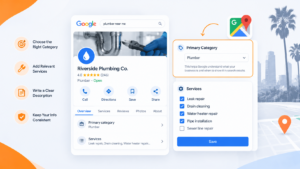
Pick the most specific category that describes what you primarily are, not the broadest one that describes everything you do.
Think of the primary category as the door you are standing in. “Contractor” puts you in a hallway with roofers, electricians, and framers, competing with all of them for nothing in particular. “Roofing contractor” puts you in the room where roofing searches actually happen.
Rules that hold up:
- One primary category, chosen for your core revenue. If you had to rank for one search, which is it?
- Secondary categories expand eligibility, not authority. Add the ones you truly serve. Adding irrelevant ones dilutes relevance and risks a guideline problem.
- Services are the long tail. A plumber listing “water heater installation,” “slab leak repair,” and “repiping” as services with real descriptions has given Google three specific matches it did not have before.
- Match the language customers use. “Slab leak repair” is what people search in older California housing stock. “Pipe remediation” is not.
Where this gets tested: a business whose categories and services genuinely differ by location needs that reflected per profile. A full breakdown lives in our multi-location SEO strategy guide, including which locations qualify for their own profile in the first place.
What Is the Right Google Business Profile Reviews Strategy?
Ask every genuine customer, offer nothing in return, and never filter who you ask.
That last clause is where most businesses quietly break policy. Google’sprohibited and restricted content policies state that merchants may not discourage or prohibit negative reviews, and may not selectively solicit positive reviews.
Review gating, the common practice of surveying people first and routing only the happy ones to Google, is exactly that.
The policies also prohibit:
- Incentivized reviews. Payment, discounts, free goods, or services offered in exchange for a review. Incentivized content gets removed.
- Paying to revise or remove a review. Offering an incentive to change or take down a negative review violates the policy.
- On-premises pressure. Requiring or pressuring customers to post while they are inside your business.
- Requesting specific content. Asking for a particular rating, or requiring that the review name a staff member.
- Staff review quotas. Setting targets for employees to generate reviews.
- Conflict-of-interest reviews. Content tied to current or former employment gets removed.
What remains permitted is straightforward: solicit reviews from customers who had a genuine experience, with no incentive and no attempt to influence the rating or the content.
On responses, be careful about what you claim. Google says replying shows you value feedback and that helpful replies can help a business stand out. It does not say replies improve ranking.
We respond to every review anyway, because a profile with thoughtful owner responses converts better than one with none. We would not sell it as a ranking tactic.
One honest caveat: review velocity advice is largely unverified. The “steady trickle beats a burst” guidance you will read everywhere has no confirmation from Google. A sudden flood of reviews after years of none is worth avoiding because it looks inorganic to humans, not because anyone has demonstrated an algorithmic penalty.
Do Photos and Google Posts Actually Help Rankings?
Photos: likely yes, indirectly. Posts: the evidence is thin, and we will not pretend otherwise.
Google lists adding photos and videos among its recommendations for improving local ranking, framing them as a way to show what you offer and tell your story. That places photos inside the official guidance.
Posts are different. Google does not name them in its local ranking guidance at all. Several vendor pages assert that posts improve rankings. At least one service page we reviewed was more candid, noting there is little evidence they do.
So here is our position. Post because it fills the profile with current, specific content that converts browsers into callers, and because an abandoned profile with a two-year-old post signals neglect to a human reader. Do not post expecting map pack movement.
Practical photo guidance for California businesses
- Shoot the exterior with signage visible, from the direction customers approach. This also supports video verification later.
- Shoot interiors that answer a question: waiting room cleanliness, equipment, the actual team.
- Use recognizable local context instead of faking metadata. A real local backdrop does more than EXIF tinkering, which Google has given no indication it uses for ranking.
- Replace stock photography. It is the fastest credibility leak on a profile.
Service Area Business or Storefront: Which Setup Do You Need?
If customers come to you, you are a storefront. If you travel to customers, you are a service area business. If both, you are hybrid, and the rules are stricter than most businesses realize.
Google’s guidelines are specific here:
| Setup | Address shown? | Key constraints |
| Storefront | Yes | Must keep permanent signage with the business name at that address |
| Service area business | No, hide it | One profile for the central location; service area should not extend beyond roughly 2 hours of driving time |
| Hybrid | Yes, plus service area | The location must be staffed and able to receive customers during stated hours |
A plumber working from a home address should remove that address from the profile. Google names this example directly.
Two constraints catch California businesses specifically.
The 2-hour driving rule collides with California geography. A service area business in Bakersfield can legitimately reach a wide radius. One in San Francisco cannot claim the entire Bay Area and the Central Valley, and setting an implausible area invites a quality review.
Age-restricted categories cannot be service area businesses at all. Businesses tied to alcohol, cannabis, or weapons need a storefront. Given California’s cannabis market, that rules out a delivery-only profile for an entire category of operator.
Businesses without a storefront that travel to customers are allowed one service area profile. Not one per city.
How Should Multi-City California Businesses Handle Separate Profiles?
One profile per real location. Not one per city you want to rank in.
Google states there should only be one profile per business location, and that businesses with separate locations, staff, and service areas may have one profile per location. The test is whether the location genuinely exists with its own staff, not whether you serve customers there.
This decision shapes how you structure the entire site, so we covered it properly in a dedicated piece. Our guide to ranking every branch across California walks through the eligibility test, bulk verification thresholds, and how location pages should map to profiles.
The short version for this article: wanting to rank in Irvine is not grounds for an Irvine profile. A staffed Irvine office is.
How Do You Track Whether Any of This Worked?
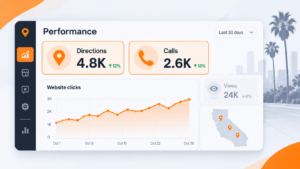
Track directions requests and calls. Ignore views.
Views measure how often Google showed you. Directions and calls measure how often someone decided to act. Those are different questions, and only one of them pays.
Google’s Business Profile performance report covers these metrics, though not all appear for every business:
- Interactions: total profile interactions
- Searches: the search terms people used to find you
- Views: people who viewed the profile on Google Search and Google Maps
- Directions: people who requested directions
- Calls: taps on the call button, which requires a phone number on the profile
- Website clicks: clicks on the website link
- Messages: distinct message conversations
- Bookings and booking clicks, for businesses using a booking provider
- Products, menus, and offers, depending on category
Two measurement details worth knowing, both from Google’s documentation:
- Searches data updates at the start of each month and can take up to five days to appear. If you check on the 2nd and see nothing, nothing is broken.
- Views count unique visitors, capped at once per person per day. A customer who checks you on a phone and a laptop may be counted fewer times than you expect, which is why view counts here can run lower than counts shown in profile notifications.
Build the habit of exporting the Searches report monthly. It is the only place Google tells you, in the customer’s own words, which queries your profile is actually eligible for.
When “near me” phrasings start appearing in that list for the right services, the relevance work is landing. The broader measurement framework sits inside our complete local SEO guide for small businesses, which connects profile data to the rest of your reporting.
Where Most California Profiles Go Wrong
Four failure patterns account for most of what we see:
- Keywords stuffed into the business name. The most common suspension trigger, and the easiest to avoid.
- A broad primary category. Chosen to “cover everything,” it ends up matching nothing specific.
- Review gating. Usually installed by well-meaning software, usually against policy.
- A service area drawn to match ambition rather than operations. Especially across California’s metros.
None of these are hard to fix. All of them are much harder to fix after a suspension.
Getting Help With Google Business Profile Management
Profile work sits inside a wider discipline. Google Business Profile SEO shares its foundations with Google Maps SEO and the rest of local search: accurate data, specific relevance signals, and prominence built over time rather than bought.
If you would rather not run it yourself, this is the core of what our local SEO services for California businesses cover. That includes profile management, category and service structuring, review systems that stay inside policy, and monthly reporting on directions and calls rather than vanity metrics.
Either way, start with the category and the name field. Those two decisions constrain everything else.
Frequently Asked Questions
How long does it take to see results from Google Business Profile optimization in California?
Profile changes like categories and services can affect eligibility within days, but ranking movement is slower and depends on competition. In dense California metros, expect several weeks to a few months before positions stabilize. Prominence signals like review volume and links accumulate gradually, so the compounding part of the work shows up later than the setup fixes do.
Can a service area business rank without a physical address in California?
Yes. Google allows businesses without a storefront that travel to customers one service area profile, with the address hidden. The constraint is the service area itself, which Google says should not extend beyond roughly two hours of driving time from your base. You still rank on distance from the searcher, so a statewide service area does not produce statewide rankings.
What is the single most important Google Business Profile ranking factor?
Primary category, because it determines which searches you are eligible to appear for before any other signal is weighed. Relevance, distance, and prominence all matter, but category sits upstream of relevance. A perfectly optimized profile in the wrong category competes for the wrong queries.
How many reviews do you need to rank in the local pack?
There is no threshold Google publishes. Google states that more reviews and positive ratings can improve local ranking under prominence, without naming a number. The practical benchmark is the set of profiles currently ranking in your category and city, since that is the field you are actually competing in.
Do Google Business Profile posts help rankings?
Probably not directly. Google does not include posts in its published local ranking guidance, unlike photos, which it does name. Posts are worth doing for conversion and for signaling an actively managed profile, but treat ranking claims about them with skepticism.
Should we respond to every review?
Yes, though not for the reason usually given. Google says replies show you value feedback and can help a business stand out, but it does not state that replies improve ranking. The case for responding is conversion. A profile where the owner answers criticism thoughtfully reads very differently to a prospective customer than one where nobody replies.
Can you rank in a California city without a location there?
Not reliably, and not through a profile. Distance from the searcher is a factor you cannot optimize away, and creating a profile at an address you do not genuinely operate from risks suspension. Ranking in a city you serve but are not located in is a job for location pages on your website, not for additional profiles.
What should you do if your Google Business Profile gets suspended in California?
Fix the underlying violation before appealing. Most suspensions trace to the name field, an ineligible address such as a virtual office, or a service area that does not match operations. Correct the issue first, then submit a reinstatement request with evidence such as signage photos, utility bills, or licensing. Appealing without fixing the cause usually fails.